
Introduction
This article describes how to view and export the NDA Report to Excel.
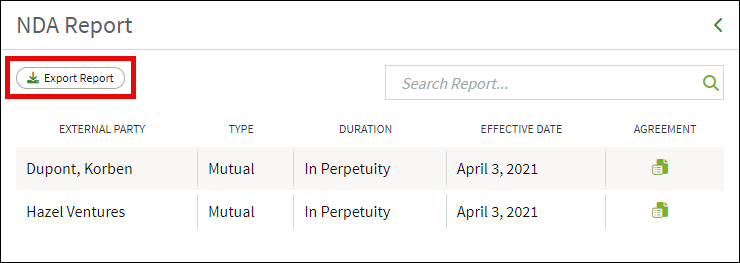
The NDA Report includes the external party's name, type, duration, effective date as well as a downloadable PDF of each Non-Disclosure Agreement (NDA).
This report only appears on your dashboard if you have run the NDA Workflow for external parties at least once.
Accessing the NDA Report
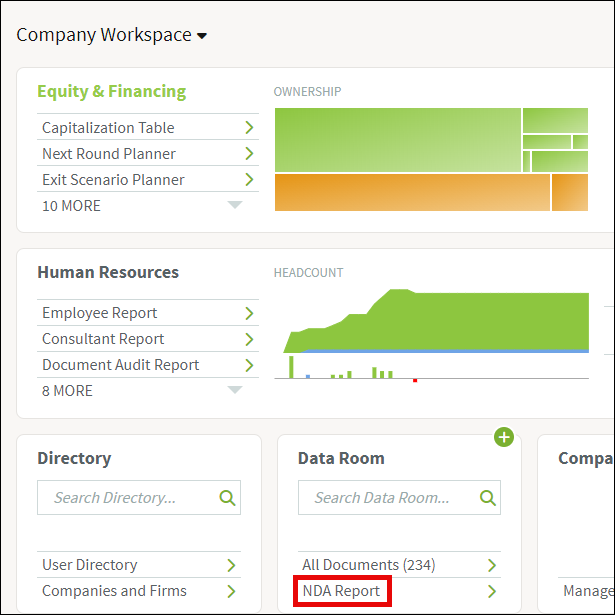
If you've run the Non-Disclosure Agreement (NDA) workflow, you'll see an NDA Report option on your company workspace, under the Data Room heading:
Exporting the NDA Report
Once the NDA Report has been opened, you can download each agreement, and look at the type, duration, or effective date by clicking on the green paper icon on the right-hand side. You can also export the report to Excel by clicking Export Report. The report will be downloaded to your computer.
Screenshots are for illustrative purposes only.
Fidelity Private Shares LLC provides cap table management and other administrative services to private companies and their equity compensation plans.
Fidelity Private Shares LLC
© 2025 FMR LLC. All rights reserved.
1093834.2.0