
Introduction
Delaware General Corporation Law Section 228 requires that all stockholders receive a Stockholder Communication (often called a 228 Notice) whenever there is a stockholder consent in which they didn't participate. For example, if there are 10 investors and five were invited to sign a stockholder consent to meet the voting threshold, the other five must receive a 228 Notice to let them know what happened in the consent, since they weren't part of the approval process but would have been entitled to participate in the vote if it was taken at a meeting.
This article explains how to create and distribute a 228 Notice to your stockholders. There are two paths available for this workflow: a guided workflow where the workflow will assist you in each step of the communication, or an upload path to capture a 228 Notice that has been executed outside of the platform.
Click the links below to jump to that section of the article:
Guided Workflow
Getting Started
The guided option will assist you in generating and documenting the Stockholder Communication (228 Notice) for consents that were generated in Fidelity Private Shares. You also have the option to send an email to stockholders with the communication.
- From the Company Workspace, go to Start New Workflow > Governance > Stockholder Communication (228 Notice).
- Select Create Stockholder Communication (228 Notice) and click Continue.
- Select the date and time you wish to send the communication. Note that the distribution time must be in the future.
- Check the box for each consent you wish to include in the communication.
- If you wish to include a cover letter, check the box and click Choose a file to upload the cover letter from your computer.
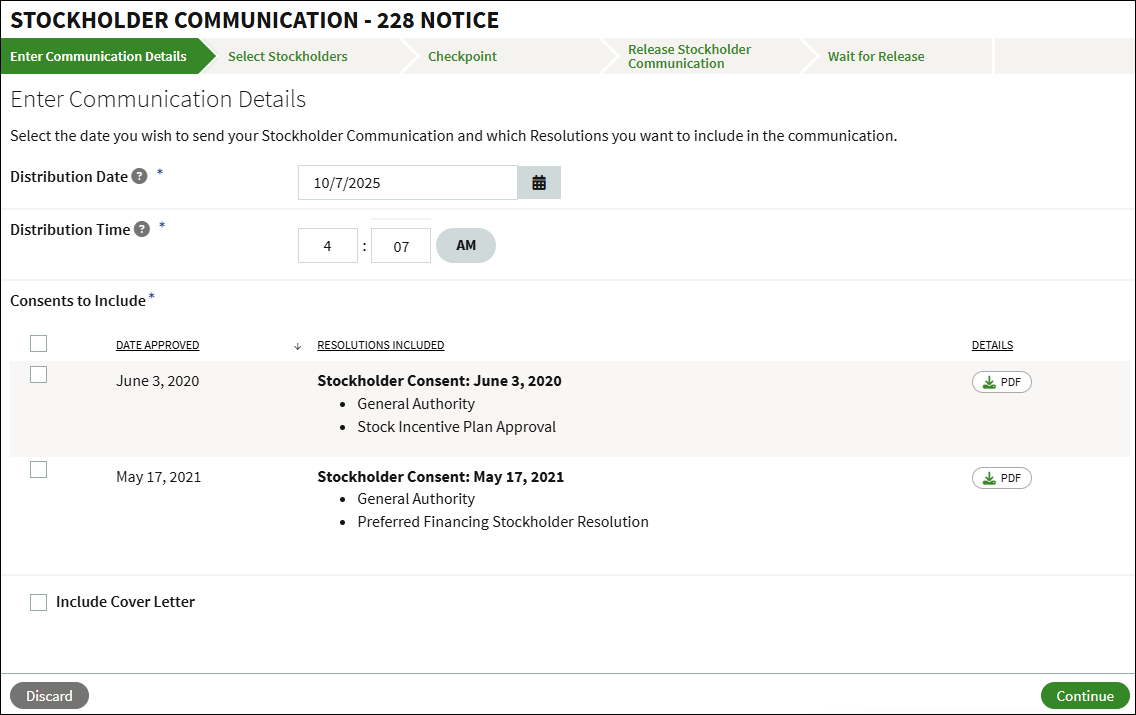
- Click Continue.
Select Stockholders
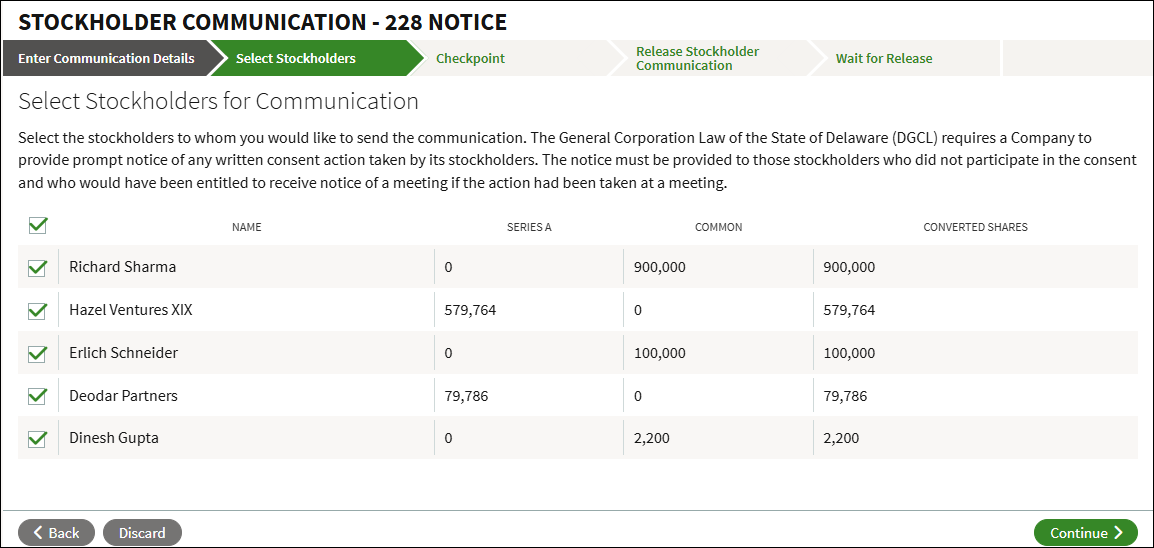
Select the stockholders to whom you would like to send the communication. A notice must be provided to those stockholders who did not participate in the consent and who would have been entitled to receive notice of a meeting if the action had been taken at a meeting. When all selections have been made, click Continue.
Checkpoint
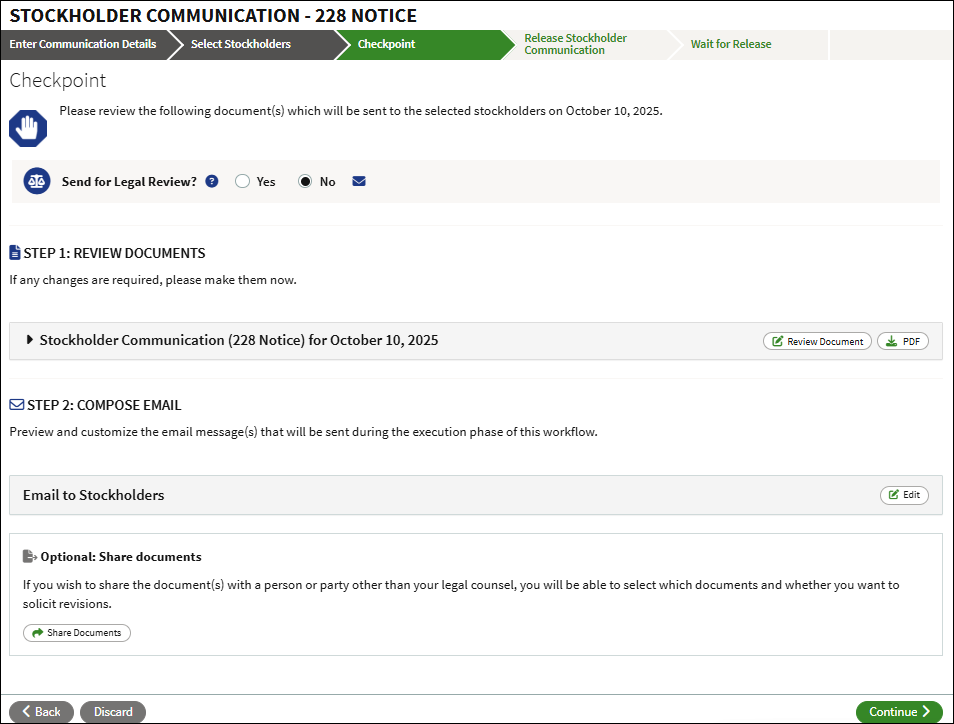
At the checkpoint you can review the documents before they are sent out. You can opt to send the workflow for legal review, and you can edit the body of the email that is sent out. Once you click Continue you will not be able to make any modifications.
Release Stockholder Communication
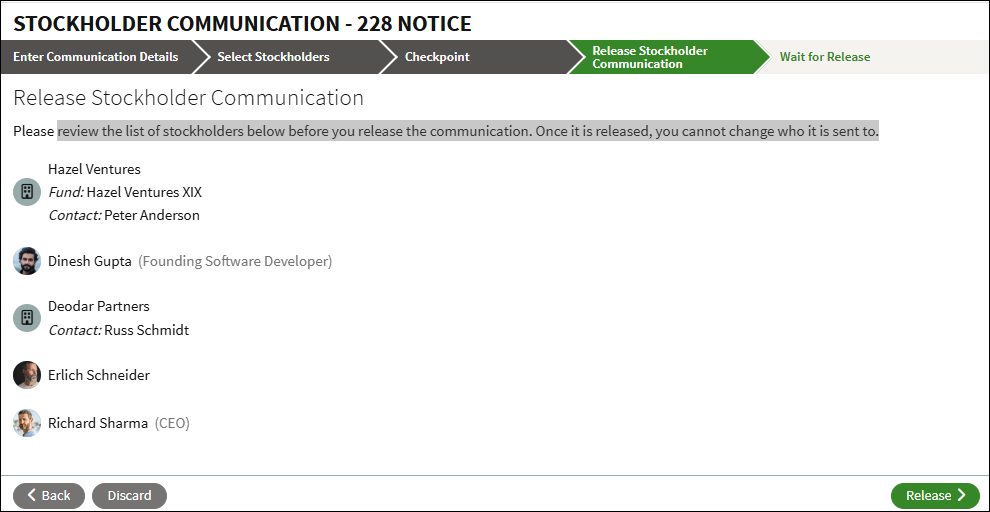
Review the list of stockholders one last time before you release the communication. Once you click Release, you cannot change who it is sent to.
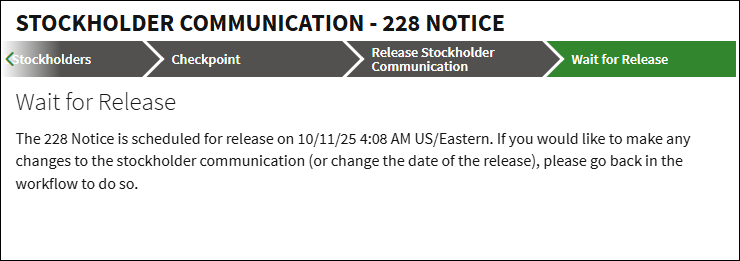
Wait for release
The release of stockholder communication will occur on the date and at the time that was scheduled upon starting this workflow. There is also the option to Discard which will cancel the action and remove any draft or pending documents as long as it is discarded before the scheduled release date and time.
Upload Workflow
Getting Started
The upload path allows you to upload and document an existing Stockholder Communication (228 Notice) that was executed outside of Fidelity Private Shares. You also have the option to send an email to stockholders with the communication.
- On the Company Workspace, go to Start New Workflow > Governance > Stockholder Communication (228 Notice).
- Select Upload Existing Stockholder Communication (228 Notice) and click Continue.
- Click Choose a file to upload the Stockholder Communication from your computer.
- Select the date and time you wish to send the communication. Note that the distribution time must be in the future.
- Check the box for each consent you wish to include in the communication.
- If you wish to include a cover letter, check the box and click Choose a file to upload the cover letter from your computer.
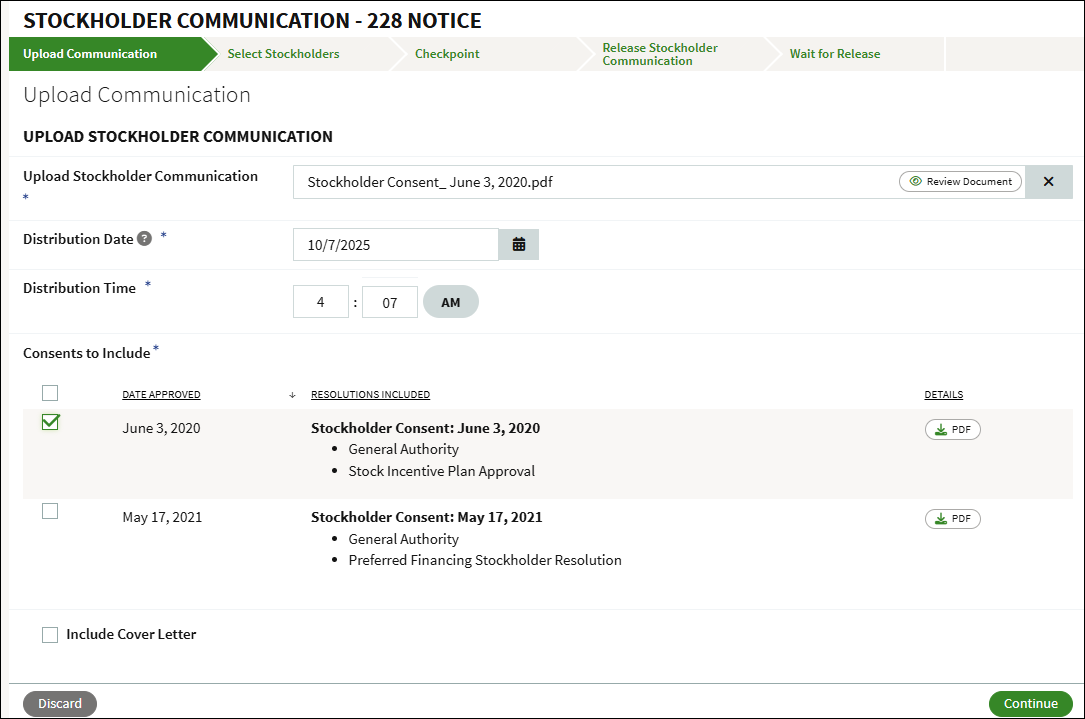
- Click Continue.
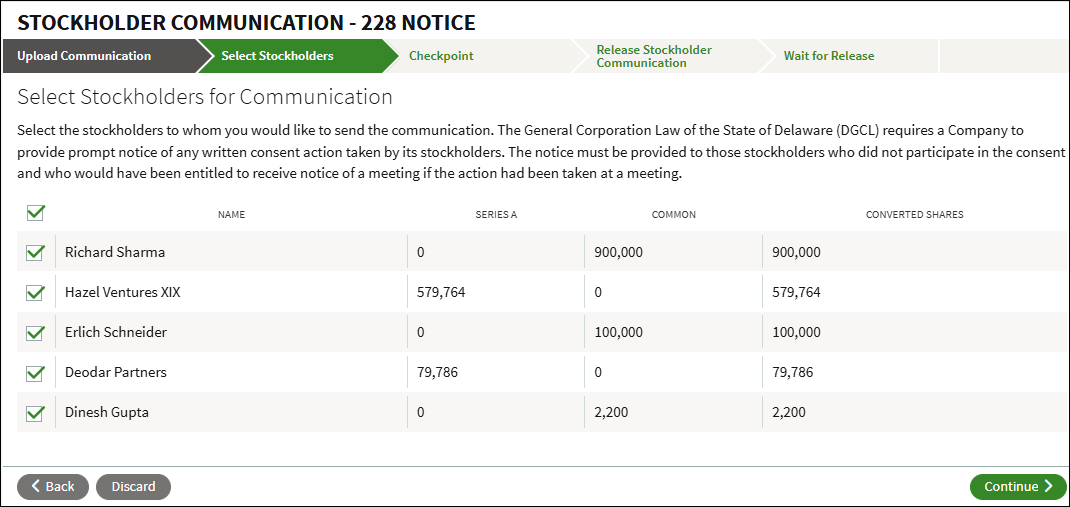
Select Stockholders
This page is where you can select the stockholders to whom you would like to send the communication. A notice must be provided to those stockholders who did not participate in the consent and who would have been entitled to receive notice of a meeting if the action had been taken at a meeting. When all selections have been made, click Continue.
Checkpoint
At the checkpoint you can review the documents before they are sent out. You can opt to send the workflow for legal review, and you can edit the body of the email that is sent out. Once you click Continue you will not be able to make any modifications.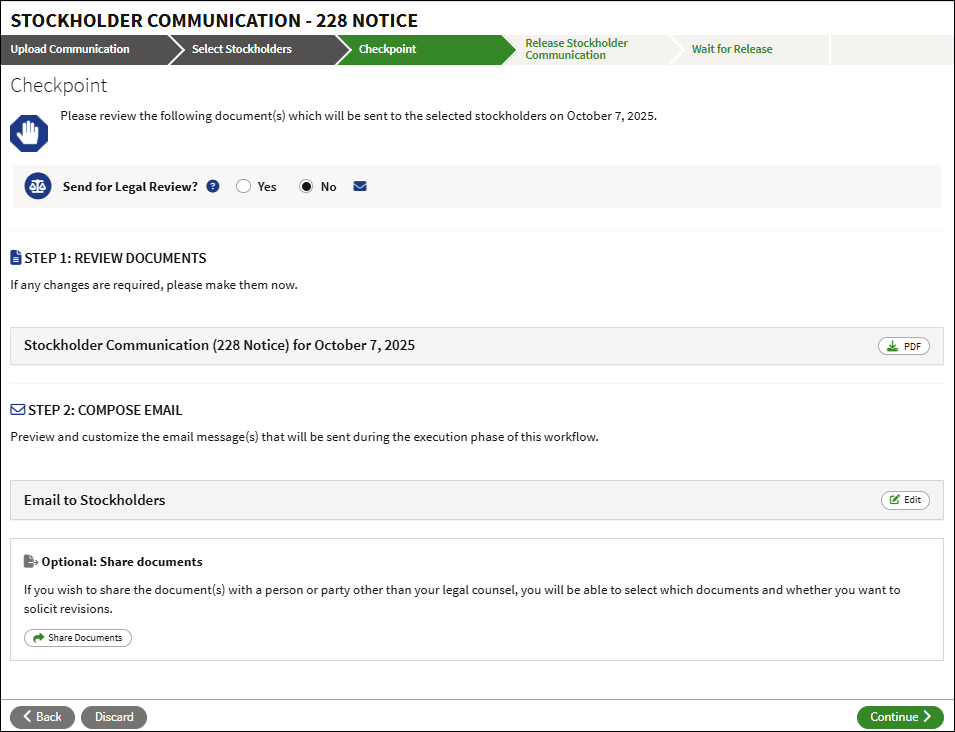
Release Stockholder Communication
Review the list of stockholders one last time before you release the communication. Once you click Release, you cannot change who it is sent to.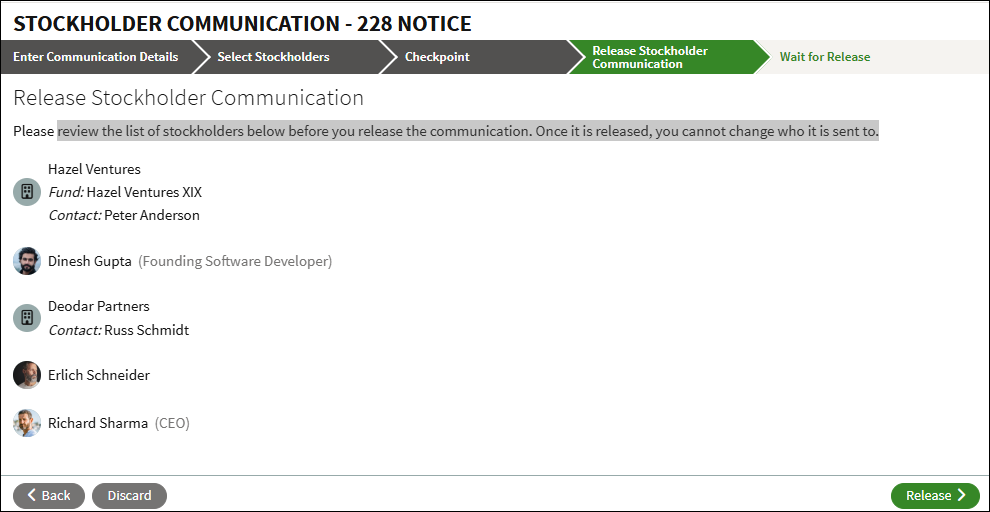
Wait for release
The release of stockholder communication will occur on the date and at the time that was scheduled upon starting this workflow. There is also the option to Discard which will cancel the action and remove any draft or pending documents as long as it is discarded before the scheduled release date and time.
FAQs
Why am I getting an error message that 'there are no approved consents that haven't been communicated yet' when I'm trying to generate a 228 Notice?
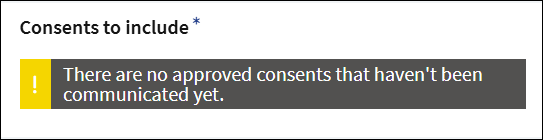
This error appears when there are no applicable stockholder consents available in Fidelity Private Shares.
- The Guided Workflow only displays applicable consents that were generated within the platform.
- The Upload Workflow only displays applicable consents that have been uploaded to the platform.
If the consent is associated with a different workflow, verify that the workflow has progressed to the appropriate stage for the consent to be distributed.
If no applicable consent is available, you can generate a new consent or upload an existing consent by running the Create Stockholder Consent workflow.
For the guided workflow option, is this a one-time setup that will then apply to future 228 Notices? This is a one-time process for any of the previous resolutions approved in the last generative consent, so you will need to re-run this workflow whenever there are new consents. However, this workflow will track who has or has not voted and will prepopulate the list of stockholders when running the workflow.
What is the difference between the Investor Updates workflow and this workflow? To send a general update to all stockholders, you'll want to use the Investor Updates workflow. If you need to notify stockholders about resolutions that were approved, you will want to run the Stockholder Communication (228 Notice).
Screenshots are for illustrative purposes only.
Fidelity does not provide legal or tax advice. The information herein is general in nature and should not be considered legal or tax advice. Consult an attorney or tax professional regarding your specific situation.
Fidelity Private Shares LLC provides cap table management and other administrative services to private companies and their equity compensation plans.
Fidelity Private Shares LLC
© 2026 FMR LLC. All rights reserved.
1217746.1.0