
Introduction
In order to grant shares below Fair Market Value (FMV) changes must be made in the Administration Settings to allow the Grant Shares workflow to accept values other than FMV. Note that this only applies to RSAs, and not to stock options (ISOs or NQOs). Please see this article if you are looking to issue grants above FMV.
Changing Administration Settings
Please note that full company access users will be able to change these settings. If you believe that your permissions should be expanded, consult with the appropriate individual at your company and direct them to these instructions.
- Navigate to the Administration Workspace (either click the Gear icon on the bottom left corner, or click on Company Workspace and select Administration Workspace.)
- Go to General Settings > Workflow Administration.
-4.png?width=670&height=184&name=image%20(6)-4.png)
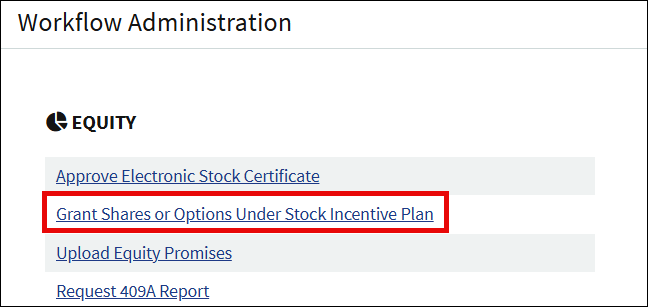
- Click on Grant Shares or Options Under Stock Incentive Plan.
- Select Yes to allow grants to be priced below FMV.
-May-07-2026-12-16-39-2345-PM.png?width=500&height=321&name=image%20(1)-May-07-2026-12-16-39-2345-PM.png)
- Scroll to the bottom of the page and click Save.
Changes in the Grant Shares workflow
Once the workflow settings have been changed, there will be some differences in the Grant Shares workflow. The workflow will function similarly but there are some changes as described below.
Getting Started
When you run the Grant Shares workflow, you will have an option to select if the grants will be issued at or above FMV, below FMV, or a mix.
-May-07-2026-12-17-48-3391-PM.png?width=670&height=282&name=image%20(2)-May-07-2026-12-17-48-3391-PM.png)
List Grant Recipients
Click Add Grant on the List Grant Recipients page. Enter in the price per share, which can now be below the FMV.
-May-07-2026-12-18-19-0108-PM.png?width=670&height=415&name=image%20(3)-May-07-2026-12-18-19-0108-PM.png)
Check the box if the grant is issued for alternative consideration, e.g. assignment of IP or for services rendered. There are important tax consequences that may require the input of your legal counsel and/or tax advisors when issuing a grant for alternative consideration.
Board Approval & Checkpoint
If you select to use the generated Board Consent to approve the grant, note that the drafted resolution will not include language about the FMV as typically seen with grants issued at or above FMV. If you are unsure what to include on the resolution you should check with your legal counsel.
Screenshots are for illustrative purposes only.
Fidelity provides cap table management and other administrative services to private companies and their equity compensation plans.
1090610.2.0
© 2024 FMR LLC. All rights reserved.