
Introduction
The Stakeholder Visibility settings allow companies to control whether stakeholders can view fair market value (FMV) and/or ownership percentage within the My Equity or Investments page. By default, FMV and ownership percentage will not display and must be enabled.
Enabling FMV Visibility displays the company's latest FMV, typically from a 409A valuation or a board-determined valuation.You will have the option to display the FMV to all stakeholders, or only selected stakeholders.
Enabling Ownership Percentage Visibility will display the stakeholder's ownership on a fully diluted basis, assuming all options and/or warrants are treated as exercised. This matches the Fully Diluted percentage column in the Capitalization Table. Note that outstanding convertible notes or SAFEs are not included in the ownership percentage calculation. You will have the option to display the ownership percentage to all stakeholders, or only selected stakeholders.
Click the links below to jump to that section of the article:
Enabling Stakeholder Visibility
Only users with Full Access or Full Equity Access can manage Stakeholder Visibility.
Fair Market Value Visibility
Follow these steps to enable Fair Market Value Visibility:
- From the Administration Workspace navigate to Equity Settings > Stakeholder Visibility.
- Select Fair Market Value Visibility.
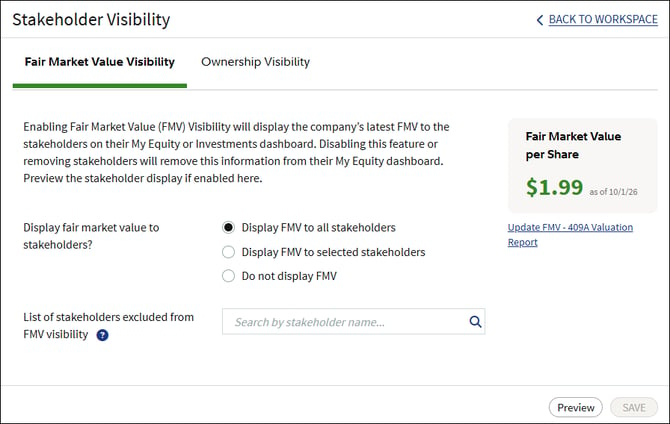
- Select an option to Display FMV to all stakeholders, Display FMV to selected stakeholders, or Do not display FMV.
- If Display FMV to all stakeholders is selected, you can add specific stakeholders who will be excluded from FMV visibility. Search for and select a stakeholder to add them to the excluded list.

- If Display FMV to selected stakeholders is selected, search for and select each stakeholder to have FMV visibility.

- Click Preview to see a rendering of the FMV Visibility on a stakeholder's My Equity or Investments page.
- Click Save.
FMV will only display if there is an FMV on file. See these articles for information on uploading an existing FMV, or requesting a new 409a Valuation.
Ownership Visibility
Follow these steps to enable Ownership Visibility:
- From the Administration Workspace, navigate to Equity Settings > Stakeholder Visibility.
- Select Ownership Visibility.
- Select an option to Display ownership percentage to all stakeholders, Display ownership percentage to selected stakeholders, or Do not display ownership percentage.
- If Display ownership percentage to all stakeholders is selected, you can add specific stakeholders who will be excluded from ownership percentage visibility. Search for and select a stakeholder to add them to the excluded list.

- If Display ownership percentage to selected stakeholders is selected, search for and select each stakeholder to have ownership percentage visibility.

- Click Preview to see a rendering of the ownership percentage visibility on a stakeholder's My Equity or Investments page.
- Click Save.
Stakeholder experience
When enabled, stakeholders will see the FMV and/or their ownership percentage on the My Equity or Investments page. For more information on these views, see this article on viewing your equity.
Individual stakeholders
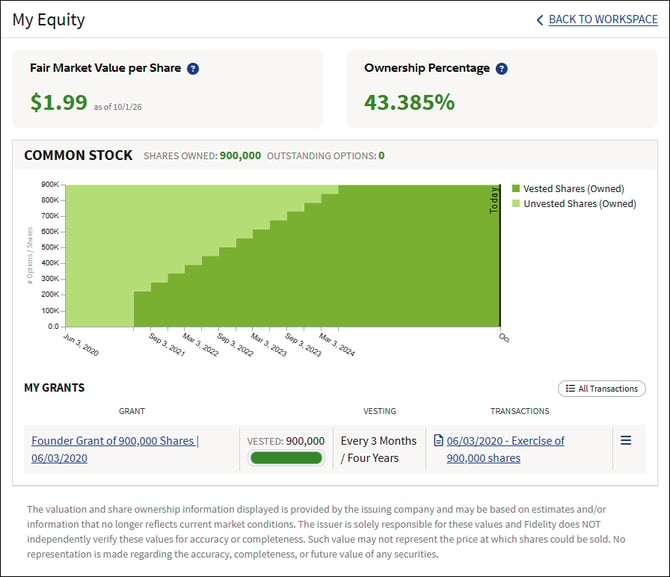
From My Workspace, click on My Equity. The Fair Market Value per Share and/or Ownership Percentage will display on the top of the page.
Clicking into a grant, the FMV will display in the Overview tab of the Detailed Grant view. 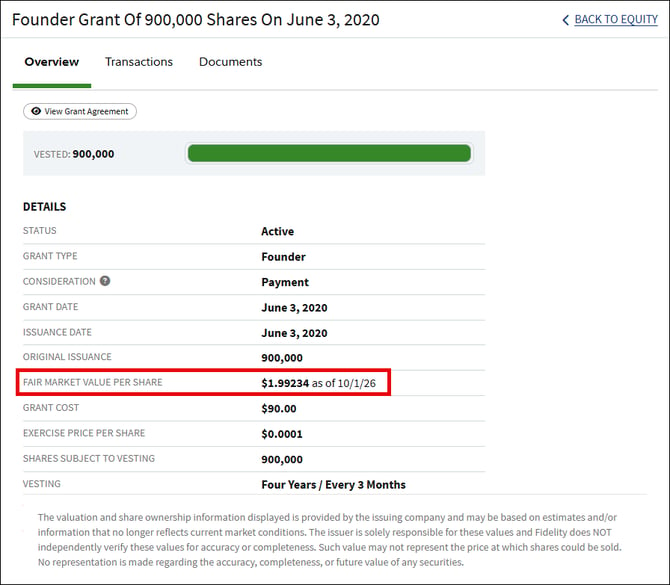
Investment firm/trust/third-party entity stakeholders
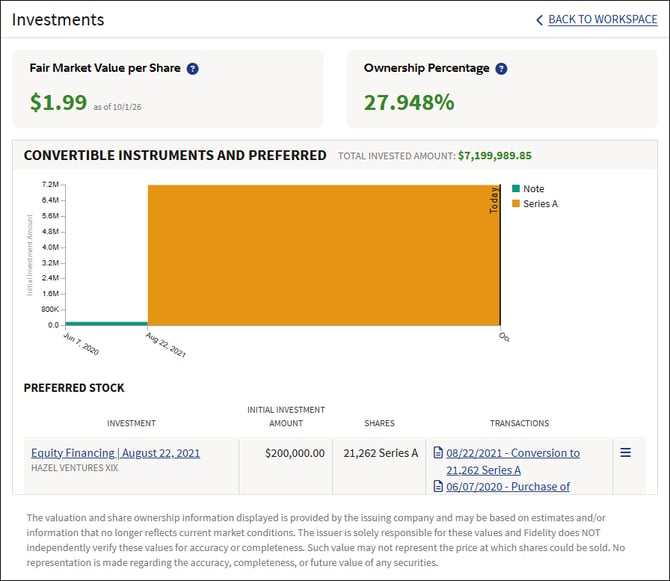
From the Investment Workspace of the issuing company, click on Investments. The Fair Market Value per Share and/or Ownership Percentage will display on the top of the page.
FAQs
Why did my ownership percentage change? Ownership percentage is calculated based on the company’s current capitalization and may fluctuate as new equity is issued or other capitalization changes occur. As a result, your ownership percentage can decrease even if the number of shares you own remains the same (this is commonly referred to as dilution). For example, after a financing round, a stakeholder may own a smaller percentage of the company while still maintaining the same number of shares.
Can FMV and Ownership Percentage Visibility be configured separately? Yes, visibility is enabled separately for FMV and for ownership percentage.
Does enabling visibility change any ownership records, documents, or reports? No. Visibility is informational only in the My Equity or Investments page.
What if there is no FMV recorded? The FMV is automatically hidden from the stakeholder experience when no FMV is recorded.
Which stakeholders will see FMV and/or ownership percentage if enabled? You can select which holders see this information by adding them individually, or if you select all stakeholders, only those with outstanding securities (even unvested securities or convertibles that are outstanding). Those with expired or cancelled shares will no longer see FMV, even if they have been individually added.
Is this a permanent change? No, you can change the visibility settings at any time.
Screenshots are for illustrative purposes only.
409A Valuations are conducted by a third party.
Fidelity Private Shares LLC provides cap table management and/or other administrative services to private companies and their equity compensation plans, and to investors in the private
markets.
Fidelity Private Shares LLC
© 2026 FMR LLC. All rights reserved.
1287377.1.0