
Introduction
Stock certificates are typically issued in two formats: paper or electronic. Fidelity Private Shares provides a streamlined solution for generating electronic stock certificates for your stockholders. For additional information see our article on stock certificates in Fidelity Private Shares, or refer to our blog post on electronic certificates.
Before proceeding, it is important to determine whether you are issuing a new certificate (one that has never been created in any form) or replacing an existing certificate, whether originally paper-based or electronic from another system. This article outlines how to create new stock certificates when generating the stock certificates has been deferred in a different workflow. For certificates issued on paper or in a different equity management platform, see this article for instructions on how to reissue existing stock certificates.
Creating New Stock Certificates
When running certain workflows where stock certificates are created, such as Grant Shares or Options, you can opt to generate new certificates as part of the workflow or you can select to defer creation at a later date using this workflow.
- To get started, go to Start New Workflow > Equity > Create New Stock Certificates.
- Select which deferred stock certificates to generate and click Continue.
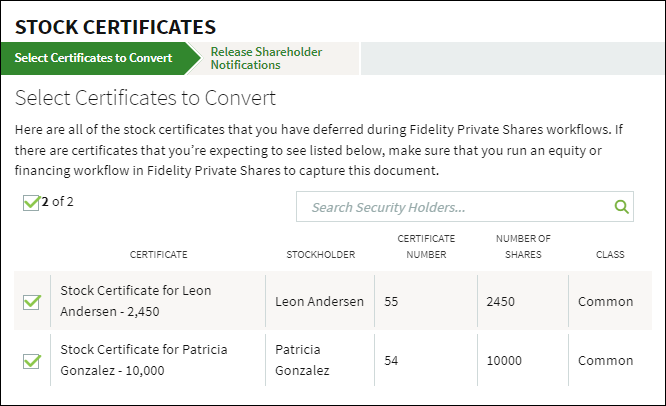
- At the Checkpoint you can review the generated certificates and manage the restrictive legends before sending the workflow for legal review.
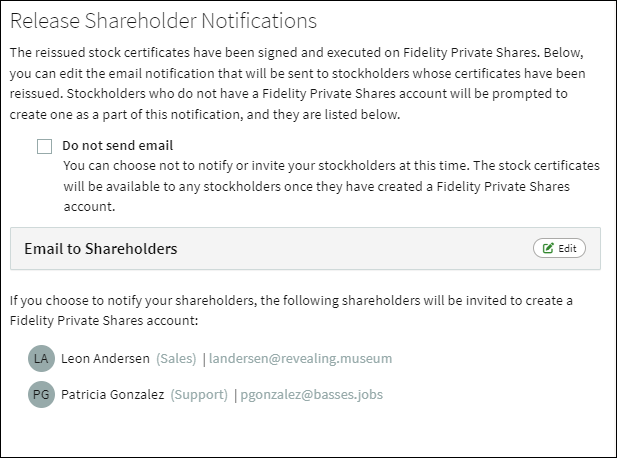
Generated stock certificates have the 1933 Legend already included in the certificate. See this article for more information about legends management. - Once approved by your legal counsel, the certificate(s) are sent to the corporate officers for signature. Once signed, the certificates are fully executed, and your cap table will be updated. If you are not ready to inform the holders that the certificates have been created, check the box to Do not send email. You can invite those users later by running the Send Invite to Existing Users workflow. Otherwise, click Continue to notify the holders, and if they are new to the platform, invite them to create their account.
- At this point the stock certificates have been generated. The Cap Table will be updated to show the current issued certificates, and the new certificates can also be viewed from the Data Room.
Screenshots are for illustrative purposes only.
Fidelity Private Shares LLC provides cap table management and other administrative services to private companies and their equity compensation plans.
Fidelity Private Shares LLC
© 2025 FMR LLC. All rights reserved.
1094556.3.0